Virtual teams can take many different forms, but essentially they involve people working together when they are not all in the same location. They might be working from home, from offices in different cities, or from several countries around the world.
So what types of virtual teams are there? Below, we look at eight of the most common, with examples of how they work and the main pros and cons to consider.

What Is a Virtual Team?
What are virtual teams? A virtual team, also called a remote team, distributed team, or geographically dispersed team, is a group of individuals who collaborate from various locations and communicate using information technology.
Employees in a remote team can work from their homes, or they can work while traveling around the world (as digital nomads do). It is also possible for employees to work for the same company but in different offices, so they still form a remote team even if they are office-based.
In addition, employees can work remotely only some of the time, and some teams can be hybrid, i.e., with some people working in the same location and others working remotely.
These setups are often part of broader hybrid workforce models, which combine office-based and remote work to offer greater flexibility.
So, as you can appreciate, virtual teams can vary, and you will need to decide which types of virtual teams are best for your organization based on your organization’s needs and those of your employees.
What Are the 8 Types of Virtual Teams?
There is no single universally accepted classification of virtual teams, and different frameworks use slightly different labels, such as project-based, functional, and global virtual teams.
Here’s a quick overview of eight common types of virtual teams:
- Networked Teams – Cross-organizational experts working toward a shared goal.
- Parallel Teams – Internal, cross-functional teams providing recommendations.
- Outsourced Teams – External providers brought in to perform specific tasks.
- Product Development Teams – Remote specialists collaborating on product creation.
- Service Teams – Support or customer service staff working across time zones.
- Management Teams – Distributed company leaders making strategic decisions.
- Action Teams – Temporarily formed teams solving urgent or critical problems.
- Freelancers/Contractors – Independent professionals hired for specific projects.
Below we explore each of these in more detail, with examples of how they function and when to use them:
Infographic: 8 Types of Virtual Teams – Symonds Research

Virtual Team Types Explained with Examples
Here are the 8 most common types of virtual teams used in companies:
1. Networked Teams
These are teams composed of people who come from different departments or organizations and work together on a common project.
People who are part of networked teams are chosen because of their expertise, which helps address complex challenges. Members of networked teams can often change as some members move on once they have finished contributing, and others join when different expertise is needed.
2. Parallel Teams
The members of this type of team come from different areas of the same organization and work together, usually for a limited amount of time, to give recommendations on processes or systems. The team members usually work together until the end of the project.
3. Outsourced Teams
These teams come together when a company needs to outsource, often offshore. A company may want to outsource if it is more convenient for them to employ an external contractor rather than build the knowledge in-house.
4. Product Development Teams
These teams are specifically created to develop a product for which the organization needs expertise that is only available in different countries.
For example, they may need engineers who are very specialized and who are based in different countries or continents.
5. Service Teams
These are teams that deliver customer service and support 24/7 and in different time zones.
6. Management Teams
They are formed by leaders or managers who are based in different locations (for example, if they work for a multinational company with offices located worldwide) and come together to make strategic decisions.
7. Action Teams
These are teams that are formed for a short time to solve urgent problems. Using virtual teams for this purpose can be useful if the expertise needed is spread geographically.
8. Freelancers and Contractors
This kind of employee works on a project-specific basis, and they are often employed remotely.
All these types of remote teams can, of course, also work from the same location, or can be hybrid teams. Being able to work virtually, though, opens up a lot more opportunities in terms of flexibility and expertise that can be used.
What Are the Pros and Cons of Virtual Teams?
| Pros of Virtual Teams | Cons of Virtual Teams |
|---|---|
| Access to global talent | Coordinating teams working across different time zones |
| Reduced office and overhead costs | Lack of face-to-face interaction |
| Improved flexibility and work-life balance | Harder to build trust and team cohesion |
| Supports around-the-clock workflows | Dependence on technology and stable internet |
| Can improve inclusion for some employees with disabilities and for people in remote or rural locations | Harder to monitor engagement and performance |
Examples of Virtual Teams
You can find remote or virtual teams in a variety of industries, and having employees collaborate remotely can work in many different settings. So, just to give you some ideas, here are a few examples of virtual teams:
- A team of online educators and teachers. They can work together to create and deliver courses in companies, colleges, and universities that run online courses.
- Creative industries teams that use IT to design items for their clients.
- Project management leaders and teams, whenever it is possible to collaborate online to plan a project, a process that often requires strong critical thinking skills to solve problems and make informed decisions.
- Software development teams.
- Research and development teams with members based around the world.
- Distributed customer support teams, who work remotely to be able to assist customers 24/7 from any time zone.
Essentially, as long as you have the right IT tools and it is not necessary for people to meet in person, you can use virtual teams.
Advantages and Disadvantages of Virtual Teams in the Workplace
Virtual teams can have many advantages as well as disadvantages. Let’s see what these pros and cons are and how you can deal with the disadvantages.
Advantages of Virtual Teams
Some benefits of virtual teams include:
- Lower costs – if you only have employees who work remotely, you can save money on costs such as renting an office.
- Wider talent pool – by employing people remotely, you will not be restricted by what skills and knowledge are available in your location, but you will be able to employ people from anywhere with the right expertise.
- Employee satisfaction – this is a benefit of virtual teams for those employees who appreciate the flexibility that working remotely can give them.
- Creativity and innovation – this is because remote teams are more likely to include more diverse staff, which in turn can lead to more innovative ideas as people from different backgrounds contribute.
- Better inclusivity – working remotely can allow some people who would not otherwise be able to travel (for example, people with certain types of health issues, those who need to care for someone, or who cannot afford to travel) to work from anywhere.
Disadvantages of Virtual Teams
Let’s now look at some disadvantages of working with virtual teams.
- Lack of face-to-face interactions – this can be the biggest hurdle for some teams to work well remotely. Many people feel that they can be more productive and creative if they can see their colleagues face-to-face, as they can chat with them anytime and have unplanned interactions. Also, working in different locations can be an obstacle to trust-building and communication in virtual teams.
- Employees’ well-being – while working remotely can be beneficial for some people, others may feel lonely and find it hard to keep their personal time separated from their work time. Learn strategies for supporting remote employees’ mental health in our wellbeing guide.
- Communication and cultural barriers – as virtual teams can be more diverse, this can make it more difficult for employees to communicate if they speak different native languages and come from different cultural backgrounds.
- Reliance on technology – virtual teams rely on IT to communicate. So, if there are technical issues (e.g., if the internet connection goes down, or if an employee is having software or hardware problems and does not know how to fix them, and support is hard to get) it can be a big problem. Also, relying on IT can create some security challenges.
- Difficulties in monitoring performance and trust issues – leading virtual teams can be hard as remote employees can be harder to monitor, while at the same time maintaining trust between managers and team members.
- Virtual teams work across multiple time zones, often relying on asynchronous collaboration, which can make it difficult to coordinate meetings or provide immediate responses.

>> Download our ready-to-use Managing Virtual Teams training Materials
How Can You Overcome the Disadvantages of Virtual Teams?
There are some things that organizations and managers can do to tackle the challenges of virtual teams and ensure best practices for virtual teams.
For example, managers and HR teams can develop successful virtual teams by:
- Running virtual team-building activities to build trust and improve collaboration.
- Developing effective ways to lead virtual team meetings.
- Training your staff on how to look after their well-being when working from home.
- Training managers on how to lead virtual teams.
- Providing cross-cultural training and intercultural communication workshops to support diverse, global teams in collaborating effectively.
- Investing in IT and IT support for employees.
- Using good time zone management practices, such as staggered shifts and shared scheduling tools, is essential to maintaining productivity and communication flow.
In addition, you might find it useful to read more on:
- Tips for Managing Hybrid Teams
- Virtual teams: Challenges and solutions for the workplace
Virtual Teams Definition Activity
This is a very simple and straightforward activity that you can use at the start of a workshop or course that you run, which teaches participants how to manage a virtual team.
The intention of this activity is to introduce and clarify the meaning of ‘virtual teams’ before providing lessons on how to manage a virtual team.
Teacher Notes
Defining a team
“Before we progress any further, let’s make it clear what we mean by the words team and virtual”.
[At first, only show the first box on the left with the word ‘team’ and ask for a definition of ‘team’ as you see on the slide image below.]
Wait for their answers.
After they have given their answers, show your definition inside the shape you see in the slide below.

With the word ‘team’, we refer to ‘two or more interdependent individuals who work toward a common goal’. So, these are people who depend on each other; they need to work together to achieve a common goal.
The reason we need to make this clear is to avoid confusing virtual teams with virtual networks, which are not teams.
For example, an international network of marketing professionals who connect online to exchange information, ideas, and advice about marketing is not a team.
These professionals support each other, but they are also independent of each other, and although they aim to further knowledge in their field, they do not have a specific goal that they need to achieve together.
On the other hand, if a company employs a marketing team that is located in different places and connects virtually to work together, that’s a team.
This marketing team is composed of people who need to work together, and each member of this team is important for them to achieve the goal of, for example, increasing the sales of product ‘x’ by 50% within 1 year.
Defining Virtuality

[Now show the second box from the left with the word ‘virtuality’ and ask for a definition of virtuality.
Wait for their answers.
After they have given their answers, show your definition inside the shape.]

When talking about virtual teams, our definition of virtuality comes down to two criteria:
- their physical dispersion in space (either within the same region or country or internationally)
- and the fact that they rely on communication technology to be able to work together.
So, these two elements together give us an idea of what a virtual team is:
Two or more interdependent individuals working together toward a common goal, who are spatially dispersed and rely on communication technology to cooperate.
Teaching How to Manage a Virtual Team
Now that you have an awareness of the different types of virtual teams and an activity you can use above, you might also be interested in the teaching materials for managing virtual teams if you are a training facilitator, college or university teacher, or lecturer.
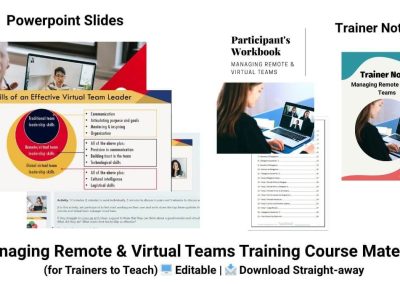
Managing Remote & Virtual Teams Training Materials
Need to train managers on how to lead remote and virtual teams effectively? These ready-to-use training materials include PowerPoint slides, trainer notes, activities, and a participant workbook for running your own in-house workshop.
View Training Materials →